Mushroom › Features
The whole list. Almost all of it is off until you ask for it. The one purchase covers everything here except Friends and file sharing, which need a membership or your own server, and the optional skins, which are sold on their own.
It watches the clock so you don't
Six small nudges, timed around what you are actually doing, and the controls to shape them.
Gentle sips, not nagging. It asks once and lets it go.
It notices how long you have really been active, then suggests a stretch.
Because lunch keeps mysteriously disappearing.
The 20-20-20 rule, remembered for you.
No pings while you are away or winding down.
A gentle check-in you answer with one tap. No wrong answer, and no opinion about it.
"Remind me in 2 hours to call Tom." Plain words, and it just happens. Or type one into the form and edit it later: every day, certain weekdays, every few days, or once a month.
Every reminder gets its own sound, its own hours, and a daily goal if you want one. Water on the clock, snacks only at lunch, and your own list of little chores for break time.
Not right now? Skip it, and the next one still arrives on the normal interval. Your mushroom takes an honest "no" as well as it takes a yes.
One menu bar click holds every nudge back for an hour, until tomorrow, or until you say so. Nothing is lost, it all arrives once you are back.
Tick a shared family calendar and your mushroom nudges you before each appointment. It only reads your calendar, and there is nothing to set up or sync.
Pick a length from the menu bar, ask in plain words, or start one from Shortcuts. It holds its nudges for the whole session and wears a small countdown. When the time is up it suggests a break, asks how it went in one tap, and the session lands in your stats. Nothing held back is lost.
Your streak, six months of activity at a glance, this week against last week. Miss a day and nothing is taken away, and a quieter week is never shown in red. Settings, Data can save the whole history out as a spreadsheet.
Your mushroom notices when a nudge keeps going unanswered at the same time of day, and offers to keep quiet then. It shows you which hours and why, and nothing changes unless you say yes. Worked out on your Mac, from what is already saved there, and never sent anywhere.
Pick a starting point and the intervals and goals are chosen for you.
Optionally stay quiet while a calendar event is on.
Stay quiet while your mic is live, for the calls no calendar knows about. It only checks whether another app is using the mic, never listens, and asks for no permission.
On a Mac with a light sensor, a nudge to put a light on. Direct download only.
Using Claude Code or Codex? Your mushroom bobs along while one works, shows when it needs you, and a click jumps back to its terminal. Your limits sit beside the menu bar icon, with a heads up before you run out. Off until you switch it on, and direct download only. It reads no prompts and no logins: exactly which files.
Turn on a macOS Focus and the pet fades back, or pauses, or both.
Out of sight until a reminder is waiting. Or always on screen. Your call.
When the window in front fills the screen it jumps down out of sight (or walks off to the side, your choice), and back once that window is out of the way. Browsers keep it company, and a right-click chooses for any one app.
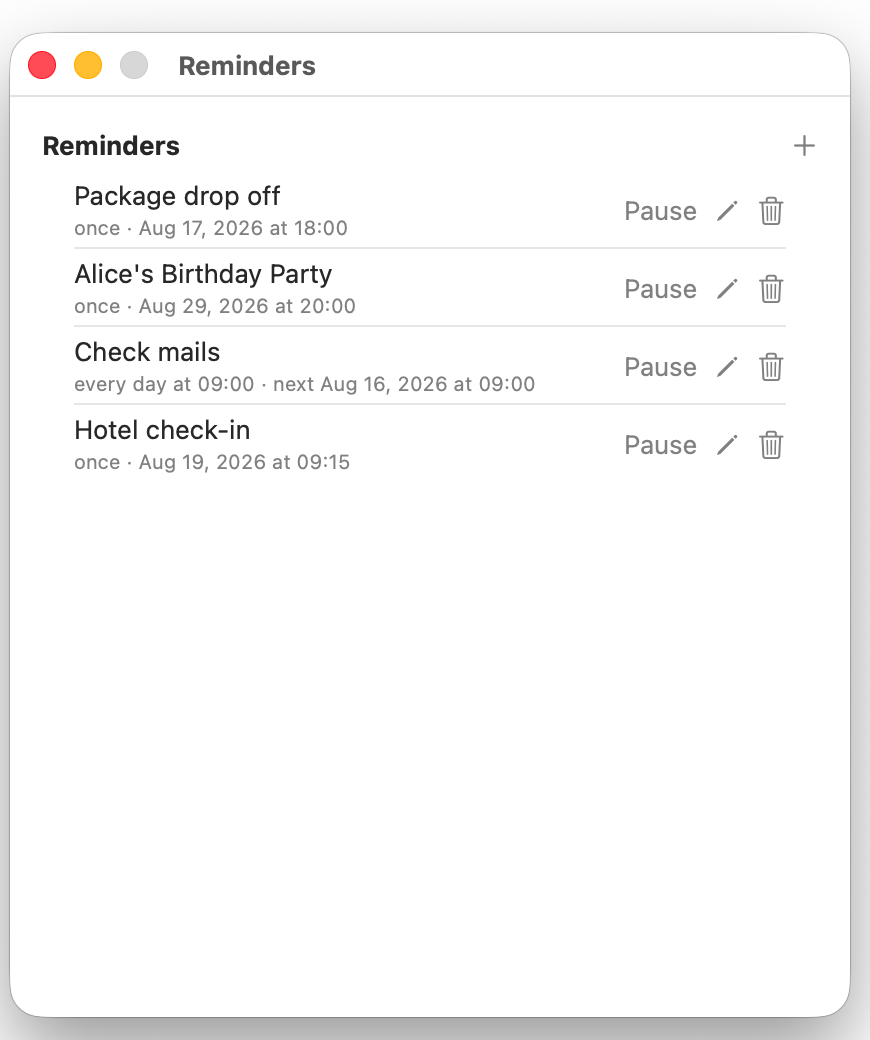
The reminders list is the only place a reminder can be paused or deleted, so nothing ever disappears by accident.
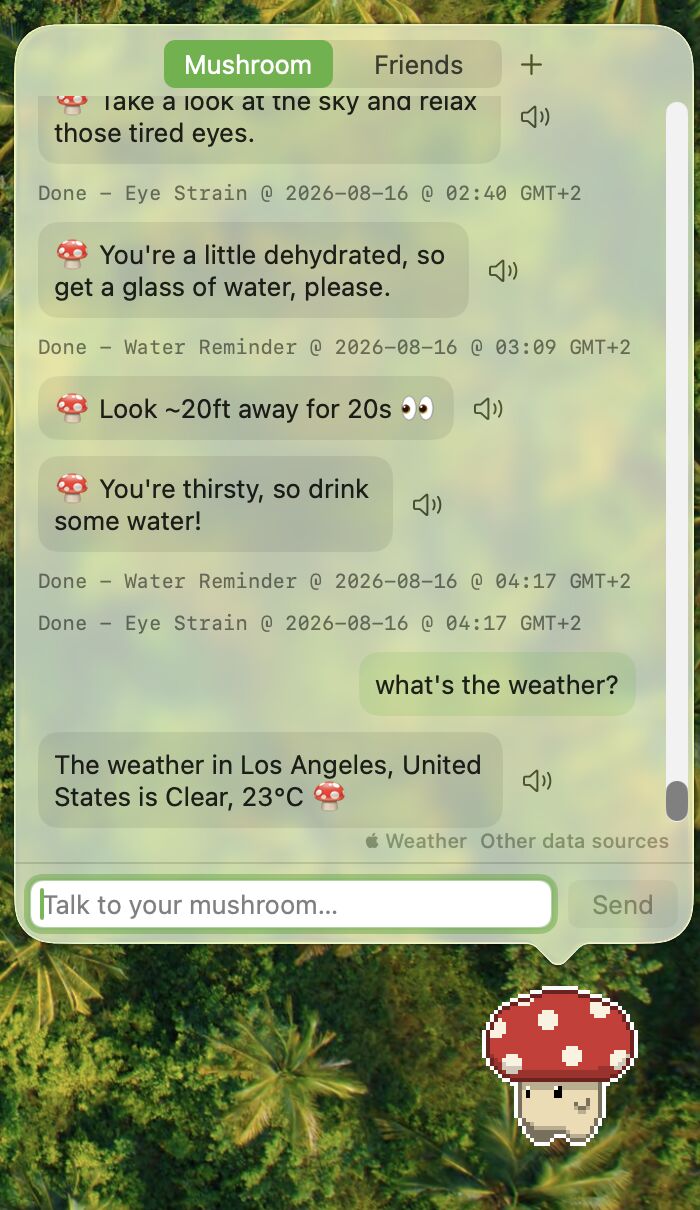
Talk to your mushroom
Ask for anything in plain language. The model runs on your Mac, on Apple Intelligence or one you download once.
Copy any text, press your shortcut, and your mushroom reads it back. Pick the voice and the speed.
Once a day your mushroom shows you an old photo, a gentle little look back. Off until you ask for it, and it only reads your photos, never changing or sending them.
List the people you would want to reach in a hurry. A help button opens big, readable rows: the name, the number in plain text, and one button that calls.
"Add a Reminder" and "Start a Focus Session" are Shortcuts actions, so they drop straight into your own automations. Mushroom does not even have to be open.
With chat pointed at your own server, say "no more eye reminders" or "make the mushroom bigger" and it changes the setting. Ask what is in your Stash, or for a file you shared, and it finds it.
One small JSON file teaches the chat a new trick: a cat fact, a word lookup, your own API. Browse the gallery.
Drop in a suspicious message and it checks the sender, the links and the files, then tells you plainly what it found.
Conditions or tomorrow's forecast, and it knows where you mean. Set your town and a little weather emoji sits beside the pet whenever no music is playing, and beside the menu bar icon on the Mac.
A gentle hello as the sun comes up, and again as it goes down.
One inspirational line and who said it, word for word.
"What time is it in Beijing?" Several places at once, if you like.
A window with search, a filter for each feed and a short summary under every headline, opening by itself at the times you pick. Quoted word for word, and Summarize writes a few cited points with the model chat uses.
A little scratchpad that saves as you type.
"Snooze that for 20 minutes." Said, done.
English, Deutsch, Français, Español, 日本語.
Record your own keys to open chat, notes, or reminders from any app.
Two little games in the menu bar, for a proper break. Mouse or keys, your choice.
Ask it to "do something cool" and it sprints across your screen.
Links, notes and files you throw at the pet, kept in one place, searchable, and synced to your phone. Ask in chat and it brings one back.
Double-click a markdown file, or choose Mushroom from Open With, and it opens clean and scrollable: headings, lists, tables, code blocks and quotes all rendered properly, no other app needed.
Ask in plain words. The model runs on your Mac, so the conversation never leaves it.
Mushroom to mushroom
Your mushroom can carry messages. Invite one person with an 8 character code that works once, then chat in a panel right under the pet. There are no usernames and no directory to appear in: a code is the only way anyone reaches you.
Messages are locked on your Mac and opened on theirs, so the server only ever passes along something it cannot read. Each conversation shows a safety number: read it out to your friend and if it matches on both Macs then nobody is in the middle. Blocking someone or deleting a conversation is one click.
Spore Storage
Drop a file on your mushroom and it hands you back a link. The file is locked on your Mac first, and the key to open it lives inside the link, so our server holds something it cannot read. Send the link to anyone, with nothing to install and no account at their end.
In your pocket
The phone carries the three things that are better in your pocket than on a Mac you have walked away from. Hold the license amount in your wallet and the companion unlocks on the same balance, with nothing extra to buy, and everything moves through your own iCloud account.
Anything you asked to be reminded of turns up on the phone too, and you can make one there. Water, breaks and the other built-in nudges stay on the Mac, because they follow how long you have really been at your desk.
Everything you saved, searchable, and you can add a link or a note from the phone's Share sheet. The offline copies of pages stay on the Mac, where there is room for them.
The same conversations, the names you gave people, and what you have already read. Point the phone at the code your Mac shows in Settings, Friends, and it will join the same license, bringing your own servers with it if that is what your Mac uses.
The phone has no pet and no chat. It is there for the moments you are away from your desk, and the Mac stays the main event.
The money rail
$MUSHROOM is not a sticker on the box. It is the license, the payment rail under the agent features, and the thing every sale in the app buys back and burns.
250,000 $MUSHROOM in the wallet you point the app at, and Mushroom Pro is on: every skin, every future version, five devices. The check reads a public balance and nothing else.
Claude Code, Codex or your own agent can book a focus block or schedule a nudge and pay for it per request in $MUSHROOM. HTTP 402 in, an answer out, no account anywhere.
Skins, passes and agent calls all route through the same buyback and burn, so using the app takes supply off the market instead of just moving it around.
One skin that is never sold: minted for the first 1,000 wallets holding through launch week, and unobtainable afterwards at any price.
On Windows 11
Mushroom runs on Windows 11 too, the same pet on your desktop. A license from this site covers your Macs and your PCs together, and the Windows app updates itself the same way the Mac one does.
Water, breaks and eye strain, timed around whether you are really at the desk, and reminders you set in plain words.
A small model you download once runs on the PC itself, or point chat at a server of your own.
Save links and notes, and message your friends, the same as on the Mac.
It stands on the taskbar wherever yours is, and follows it when it moves or changes size.
Pixel fonts, square windows and chunky buttons, like this site. Settings, General switches it back to the plain look.
A sphere of sparkling water that sloshes when you drag it, for desks where you would rather keep it low-key.
Reminders slide in on Mushroom's own little card instead of a Windows notification, and wait while a fullscreen app is in front.
iCloud sync, Shortcuts, Focus and calendar awareness are Apple features, so they stay on the Mac. Everything else is the same app on the PC, on the same license.
Add-on
Ten colors, in an add-on that puts a Skins tab in Settings. Purely cosmetic: nothing in it changes a reminder.
Free with the app, and separate from this: Settings, General also offers a Work look, a sphere of sparkling water that sloshes when you drag it, for desks where you would rather keep it low-key.
50,000 $MUSHROOM unlocks the pack, and every purchase of it is used to buy $MUSHROOM back off the market and burn it. Needs 1.23.0 or later, with black and white arriving in 1.46.0. Holding the license amount includes the pack, so most people never see this line as a price at all. The color you pick stays on the Mac you picked it on.
Kind by design
Everything lives on your Mac, and the model it chats with runs there too. It connects only to what a feature needs, and every feature that sends something of yours starts switched off.
The chat model runs on your Mac. The app has no analytics and no tracking. Only weather, the daily quote, news and the tools you add go online, and each sends only what its request needs: the place for weather, and for a tool, what you asked it to look up, sent to the service that tool uses. Plus chat itself if you point it at a server of your own.
Turn on iCloud sync and your Macs share through your own private iCloud, never through us. Leave it off and nothing syncs at all.
Both server features can run in your own cloud account or on your own hardware, and neither touches us. The server software is open source: read it or run it. That setting is in both versions.
It never sees your keystrokes. It reads one number the system already keeps: how long since you last touched anything.
Point it at a folder and it keeps a daily snapshot, the newest 3 kept, encrypted with a passphrase if you like. Restoring is one explicit act through the Import button.
What is stored, what is never sent, and the legal basis for each. Read the privacy policy.
Everything on this page, switched on, for 7 days. No account and no card.